Wednesday, 30 October 2013

Review of the Oculus Rift

After some minor setbacks I finally got the Oculus Rift up and running and I have tried quite a number of different programs and tools. One of my favourites has to be the RiftCoaster demo. This is basically a demonstration of a roller coaster. I recommend standing up for this one. It's a rush that will quickly get you hooked in the world of the Oculus Rift. I've had numerous friends try the RiftCoaster and I've seen very different reactions from some people. Most people rock a bit back and forth as it causes some mild balance issues. The most extreme I've seen is where one friend clung to the wall for dear life, whilst another friend completely collapsed on the ground (if you're reading this, you know who are).

After spending a week trying to get my PC back up on it's feet. I had some horrible issues with an old hard drive, which meant I had to completely re-install Windows 7. On the plus side, now I've a nice unburdened clean system ready for some Oculus Rift action.

So far I've tried the following programs with the Oculus Rift with various experiences

Despicable Me 2 using VRPlayer
1) Tuscany Demo (this is the first thing everyone tries)
2) VirtualReality.io
3) VRPlayer (print screen on right)
4) TriDef 3D
5) Perception 3D
6) Half Life 2: Episode 1
7) Dreadhalls
8) Eve-VR (video linked below)
9) Portal 2 using TriDef 3D

The Eve-VR youtube video is pretty impressive. Although it's best to select highest quality video, enlarge to full screen and keep your head still. For obvious reasons, you won't be able to look around like it's a proper world. It's just a video.

Now for Oculus Rift's largest problem: Motion Sickness. Full description from the Oculus Rift website in the link. It is an effect of tricking the mind that you are seeing a 3 dimensional object when in fact you are not. I have had varying degrees of motion sickness myself. I have found there are a number of tricks that you can do to reduce the effect. Using the OculusConfigUtil, which can be obtained from the Oculus Rift Developer site mentioned above, will help you configure the IPD settings. This is basically changing the distance between the two images, thus making life easier for your eyes and your brain. This has increased my game time from 5-10 minutes to greater than 30 minutes.

Other odd effects I've noticed have been a very dry mouth (probably because I gape at the beauty of it all, like some sort of ape catching flies) and a sensitivity to light (maybe turn down the brightness). With regards playing some of the games using the Oculus Rift, as my eyes are covered with the device, it's often difficult to find the keyboard and mouse as well as the right keys. I'm glad I have a wireless keyboard and mouse, but I've heard an Xbox gamepad solves this problem.

The future of the Oculus Rift is amazing, used in conjuction with other devices like the Razer Hydra (previously known as the Sixense TrueMotion) will allow you to play completely immersive games like Teddy's HydraDeck Demo as seen in the youtube video on the left.

The Razer Hydra can be purchased bundled with Portal 2, which it fully supports for a truly magnificent gaming experience. Although I'll have to save up a bit more for this to try it out.



Ender's Game Battle Sequence
As a final note, I saw Ender's Game there at the weekend and all I could think about was how the scene on the right would look incredible as a game for the Oculus Rift. I've always thought a game based on Ender's Game would be incredible and the Oculus Rift is the perfect platform for such a game.


Monday, 7 October 2013

Oculus Rift


I just recently went halves on the Oculus Rift Development Kit. So far I've only had a go at the Tuscany demo, where you get to walk around a southern Italian house. It's pretty cool so far. Being short sighted I was surprised to find three varying lenses in the kit to adjust the focal length in order to see properly. I really liked this as I was not looking forward to wearing my glasses inside the headset.

Some night this week, I'm hoping to get Half Life 2 up and working with the Oculus Rift. This is my main goal for it for the moment. I'll see what happens from there.

I hope to have another post up by end of week with more updates.

Sunday, 1 September 2013

Baking IC's

Last year I spent a month in San Francisco's sunny Silicon Valley on a business trip. I was in charge of bringing up a number of boards straight off the manufacturing line. Unfortunately there were a few problems with the boards, which left us baffled for a few days until bubbling was mentioned. This is when I found out all about MSL (moisture sensitivity level). 

On specific ICs, mostly CPLD's, FPGA's and other specialised semiconductors, the parts need to be baked at 125°C for a minimum number of hours based on the reflow temperature specific to the PCB. Now I don't know much about the whole process, but from this trip, I've learnt a little bit more. If these parts aren't baked for the specific time, bubbling, cracking, blistering, internal shorts and other related errors can occur due to the expansion of the moisture during reflow, which is called de-lamination. Most of the time, these problems may not even be visible and could take weeks of testing to find the part doesn't behave as it should. In the extreme cases, the bubbling, cracking and blistering mentioned above occur, which is commonly known as the "popcorn" effect.

There are a number of moisture sensitivity levels described on Wikipedia's page. The sensitivity level determines the time allowed for a device to remain out of its packaging before it needs to be baked again to remove moisture. Resistors and capacitors usually have a moisture sensitivity level of 1, which is infinite, where as most FPGAs or CPLDs have a level of 6, which means a mandatory bake before reflow. The one thing to note here when receiving parts from a distributor is that the parts should arrive in a vacuum sealed anti-static bag with dessicant and a moisture indicator card. These parts tend to be more expensive than the usual parts.

Trying to debug issues caused by delamination is near impossible and often it is just best practice to replace all questionable parts.

This one shortcut compromised the whole batch of boards and cost thousand's of dollars and weeks for our customer, but replacing each and every one of them would be even more costly and timely. From what I've seen, this is the quickest way to lose a manufacturing contract and another example of trust the manufacturer, but verify!

Wednesday, 10 April 2013

Interesting Tutorial on how your 4.7uF Capacitor can become a 0.33uF Capacitor

I just read an incredible article by Mark Fortunato of Maxim Integrated.

For any of you hardware engineers or applications engineers out there, this is a very useful and interesting read about how your 4.7uF capacitor can behave like a 0.33uF capacitor at +85C, which of course is exactly what you don't want to do.

http://www.maximintegrated.com/app-notes/index.mvp/id/5527


Friday, 19 October 2012

New PC is alive!!

It's alive!

So I finally put it all together last night. I powered it on and it worked without any issues. In saying that, I've only booted into the BIOS using my TV, seen that both the onboard HDMI and graphics card HDMI output work correctly. I'm missing one or two pieces to be able to get going.

So here are the things I did wrong.
1) I got Windows 7 on a DVD to burn onto the new PC, only to find out that my old DVD-RW drive was an IDE drive. I'd only just bought that new and my old PC couldn't even use it. I can't believe I bought an IDE to replace the old one. So now I have to buy an optical SATA drive. May as well go for Blu-Ray :) I think the beautiful Lite-On 12X BluRay combo on Dabs.ie for €56.06 will do perfect.
2) My old hard drives are SATA2.0 and are full. I can't install anything onto them without wiping stuff that I don't want to lose. I partitioned one of the drives in the past, keeping the OS in a 100GB partition, which should do for the moment. This will only cause a bottleneck in my nice new system though, which is not what I want, so I'm going to have to order a nice little SSD just for the OS. I'm thinking of getting Kingstons HyperX 120GB SATA600 for the job from Komplett.ie. I'm going to leave getting the mSATA drive for the moment, I want to see if I need it or not and I need to weigh up the advantages of it as well.
3) I was lucky with regards the case and the motherboard I got. There were a load of functions on the motherboard that mean the case needs specific cabling, like AC'97 cabling and HD Audio for front panel audio. The HD audio is enabled by default on the board, but it was nice to have both options from the case and the motherboard. The front panel USB ports supply 1 x USB2.0 and 1xUSB3.0. The USB2.0 cable was standard enough, but the USB3.0 is a larger connector and I was surprised to find the correct header on the motherboard.
4) The Modular Power supply was a good idea, it's all a little cramped with regards cabling, but I was able to keep it all in the one area.
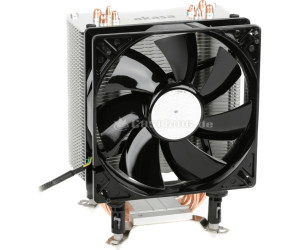
5) The new heat sink I got for the processor is massive and the way I have it at the moment, it towers over the 4th DIMM slot, which means upgrading the system memory means turning the heatsink in a non-preferred airflow direction. I may have put on too much heat sink adhesive. I'm going to have to check this again tonight.

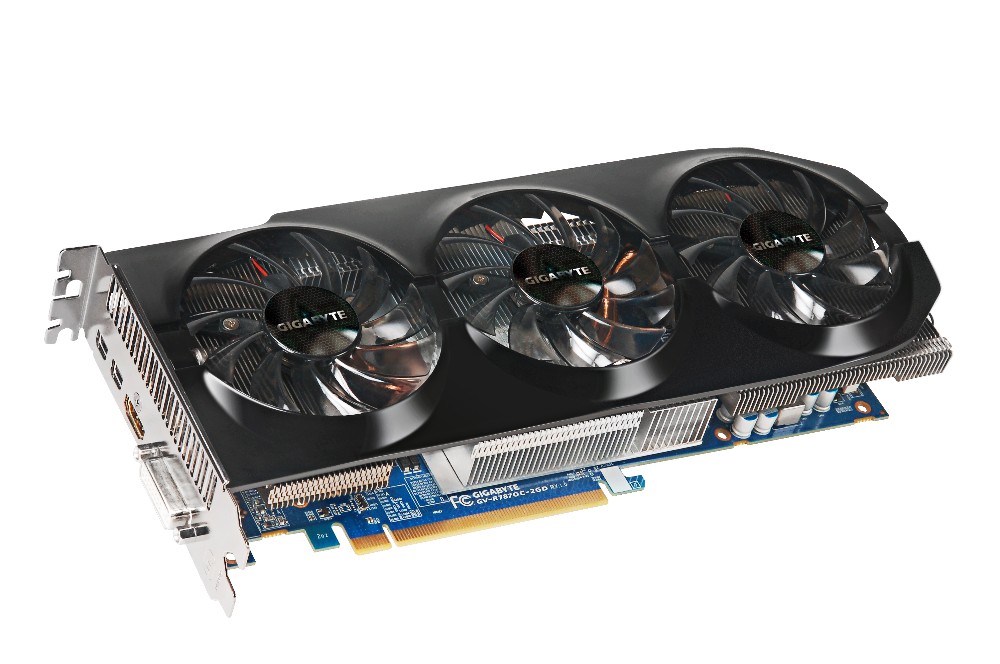
6) The Graphics card is a monster! It hasn't gotten in the way yet, but it spread from one side of the motherboard straight across to the other side. The card itself kind of gets in the way of the USB3.0 header on the board. It takes two 3x2 PCIe cables from the PSU.
7) My last little issue with the motherboard is the placement of the front panel headers. They're all fairly close together on one side, but it's the USB3.0 header which bugged me as it ends up crossing all the SATA connectors and was a little awkward when I installed the graphics card. See picture below.
 

The only old components I don't need to upgrade are the Belkin PCI 802.11G wireless card, Logitech wireless keyboard and mouse, 2.1 surround sound speaker set, 1 x 500GB SATA2.0 HDD and 1 x 1TB SATA2.0 HDD.

Useful parts that I could probably sell on are: (need to look up specifics on these)
1) 1 x nVidia 8600GT Graphics Card
2) 1 x 500W Power Supply
3) 2 x 2GB DDR2 memory.
4) 1 x Lite-On IDE DVD Drive

eBay are having a zero insertion fee this weekend, I may try and fob them off there. I'd be more than happy to give them away to friends.

Thursday, 11 October 2012

My new PC

My old desktop PC died when I moved house. I spent a whole day trying to figure out what went wrong with it. The motherboard had been acting up for a while. I put new DDR2 memory in it a while back and it caused a loud screeching sound on the audio output. I couldn't use my Creative X-Fi  sound card after a while(back in the days when sound cards were necessary for a nice sound). The card is probably still in good nick too. The built in audio on motherboards these days is just so good, it makes sound cards an option only for those recording their own music and need super high quality equipment. I'll have to upload the specs of my now dead system, just for a comparison of my move up in the world.

Anyways, onwards and upwards, my new baby is going to be a beauty. I wanted to keep it as low as possible, but I can't seem to keep it lower than €868.51 at the moment from Dabs.ie. I wish I more to  spend, but this years been an expensive year, buying house, fixing house, getting engaged and many holidays, now I'm supposed to be saving for a wedding. I figure this is my present for my 30th :)

Here's the setup:
Processor: i5-3570K S1155, 3.4GHz, 6MB cache
Processor Fan: Akasa Nero 3 premier CPU cooler (will be replaced at later date)
Motherboard: Gigabyte Z77X-UD3H S1155, Intel Z77 chipset, DDR3, PCIe3.0 (I love the 2oz copper plane for power and ground, improves cooling, noise reduction and all round better design :D )
Memory: Corsair Vengeance 8GB (2x4) DDR3 1600MHz, CL9 XMP
Graphics Card: Gigabyte ATI Radeon 7870 HD, 1100MHz, 2GB, PCIe3.0
PSU: 750W OCZ Technology Fatal1ty Series High Performance PSU
Case: Gigabyte Luxo X10 Gaming case (Front USB3.0 and Side LED fans)

I've got a bit of a Gigabyte theme going on here. I have to admit, I'm impressed with some of their stuff and I figure they'll complement each other in this system. I originally picked the EVGA nVidia Geforce GTX 650, but a good friend recommended against it as it would seriously impede this system. AnandTech's GPU product benchmark comparison tool is a great site for comparing GPU's against each other. The performance of the GTX 650 compares only a little better against the older GDDR3 PCIe2.0 cards. If I'm going to build a new system I want to use the latest technology.

I know what you're thinking, where's the SSD's, where's the monitor, what about liquid cooling? These are future updates. My old systems old SATA drives are still operational and my old monitor will have to do until I can afford a nice one. My current SATA drives may be slow and small (1 x 500GB and 1 x 1TB) and will certainly be the bottleneck in the system until they're replaced, but they'll have to wait. The same goes for the monitor, it's a VGA input only monitor measuring 21inches (was big when I got it), but I'll be wanting something larger, say 24 to 27inches with a refresh rate of about 2ms, full HDMI and more. I've yet to look into these. Any larger than 27inches and I'll have to get shares in SpecSavers, am blind enough as is.

I'll have one more crack tonight at my dead old PC to see whats working in it so I can gauge how much I can reduce the above costs. Unfortunately I'd be wary about any hardware in the old system as it was in a bad way, but if I can verify the PSU is in good nick, that could save me a €100. The power supply I've picked above is well above what I need. I used ThermalTake's PSU Wattage Calculator to calculate my systems power consumption and I got a result of 352W running at 85% TDP, so my 750W is excessive. I figure if my old PSU is good, I can keep that and leave out the new one. Even if I add a number of SSDs, SLI graphics card, I'm still under the 500W mark.

I'll sleep on it all tonight and I'll buy it tomorrow. Hopefully there will be a Friday deal that cuts my cost down again.

Wednesday, 5 September 2012

My Raspberry Pi

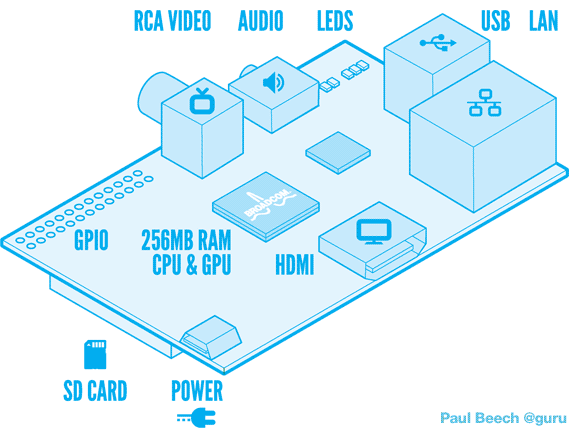
My latest gadget arrived on my desk yesterday. I haven't had a chance to turn it on yet. It features a 10/100 Ethernet port, 2 USB ports, 1 HDMI port, 1 RCA port, 1 3.5mm audio jack, SD Card slot for the OS, 1 micro USB connector for power and a number of other not so obvious connectors.


I've looked through the schematics and figured out what the other connectors do, what access I have and what are my current posibilities. So far I've figured there's a DSI port (Digital Serial Interface) for use with a touch screen. Nintendo DSi screens would be an example of the screen that can be used here, some other possible screens feature in the Apple iPhone or other Smart phones. There's a CSI camera connector as well, possible use could be something like the XBOX's Kinect. There's another connector which allows JTAG connection to the Broadcom SOC, which may he helpful in debug at some point, but I can't imagine it being much use without more specifics about the Broadcom BCM2835. The last connector is a large connector with GPIO's, I2C, Serial and a SPI interface as well as pins to provide 5V and 3.3V to external circuitry.


The one difficulty I can see so far is power. The Model B variant can use as much as 1.1A from a 5V source. The power comes from a micro USB port, which most people would power from a USB port on a desktop, laptop or TV. In most cases, USB ports only provide 0.5A at 5V. If the device tries to draw more current than available, then a drop in voltage will occur, causing some parts of the device to behave outside specification. This is all mentioned on the Raspberry Pi (RasPi) forums. Looks like I may need to sort myself out with a decent power source or build one myself. That's just my initial thoughts for the moment.

With regards what I'm going to do with it, I have a few ideas, most of which are robbed from everyone
  1. Multimedia server attached to my TV, giving me access to online streaming of videos, movies, tv series and music.
  2. Touch Screen Hi-Fi system, could be troublesome, no drivers exist yet for DSI port.
  3. Home Automation using zigbee around the house, turning on and off lights, controlling temperature, monitoring power and all that kind of thing.
  4. Serious car stereo upgrade providing music, name of song and easier use while driving.
  5. Attach a camera to allow for some sort of XBOX kinect gaming platform.
I'll have bigger and better ideas once I turn the thing on. Watch this space :)