Friday, 19 October 2012

New PC is alive!!

It's alive!

So I finally put it all together last night. I powered it on and it worked without any issues. In saying that, I've only booted into the BIOS using my TV, seen that both the onboard HDMI and graphics card HDMI output work correctly. I'm missing one or two pieces to be able to get going.

So here are the things I did wrong.
1) I got Windows 7 on a DVD to burn onto the new PC, only to find out that my old DVD-RW drive was an IDE drive. I'd only just bought that new and my old PC couldn't even use it. I can't believe I bought an IDE to replace the old one. So now I have to buy an optical SATA drive. May as well go for Blu-Ray :) I think the beautiful Lite-On 12X BluRay combo on Dabs.ie for €56.06 will do perfect.
2) My old hard drives are SATA2.0 and are full. I can't install anything onto them without wiping stuff that I don't want to lose. I partitioned one of the drives in the past, keeping the OS in a 100GB partition, which should do for the moment. This will only cause a bottleneck in my nice new system though, which is not what I want, so I'm going to have to order a nice little SSD just for the OS. I'm thinking of getting Kingstons HyperX 120GB SATA600 for the job from Komplett.ie. I'm going to leave getting the mSATA drive for the moment, I want to see if I need it or not and I need to weigh up the advantages of it as well.
3) I was lucky with regards the case and the motherboard I got. There were a load of functions on the motherboard that mean the case needs specific cabling, like AC'97 cabling and HD Audio for front panel audio. The HD audio is enabled by default on the board, but it was nice to have both options from the case and the motherboard. The front panel USB ports supply 1 x USB2.0 and 1xUSB3.0. The USB2.0 cable was standard enough, but the USB3.0 is a larger connector and I was surprised to find the correct header on the motherboard.
4) The Modular Power supply was a good idea, it's all a little cramped with regards cabling, but I was able to keep it all in the one area.
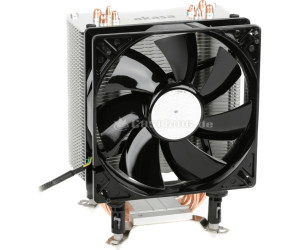
5) The new heat sink I got for the processor is massive and the way I have it at the moment, it towers over the 4th DIMM slot, which means upgrading the system memory means turning the heatsink in a non-preferred airflow direction. I may have put on too much heat sink adhesive. I'm going to have to check this again tonight.
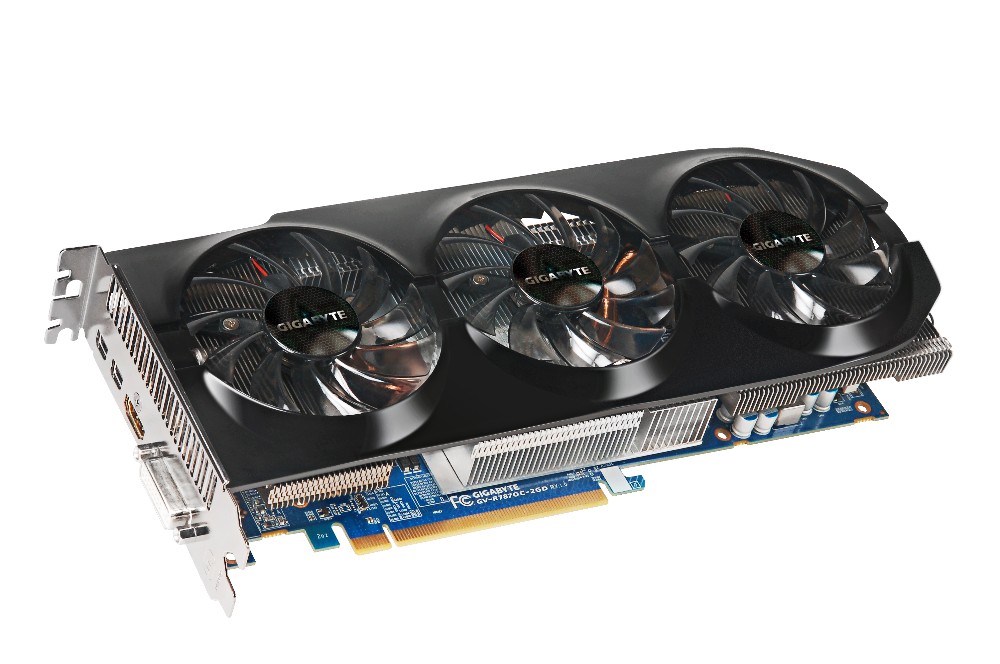
6) The Graphics card is a monster! It hasn't gotten in the way yet, but it spread from one side of the motherboard straight across to the other side. The card itself kind of gets in the way of the USB3.0 header on the board. It takes two 3x2 PCIe cables from the PSU.
7) My last little issue with the motherboard is the placement of the front panel headers. They're all fairly close together on one side, but it's the USB3.0 header which bugged me as it ends up crossing all the SATA connectors and was a little awkward when I installed the graphics card. See picture below.
 

The only old components I don't need to upgrade are the Belkin PCI 802.11G wireless card, Logitech wireless keyboard and mouse, 2.1 surround sound speaker set, 1 x 500GB SATA2.0 HDD and 1 x 1TB SATA2.0 HDD.

Useful parts that I could probably sell on are: (need to look up specifics on these)
1) 1 x nVidia 8600GT Graphics Card
2) 1 x 500W Power Supply
3) 2 x 2GB DDR2 memory.
4) 1 x Lite-On IDE DVD Drive

eBay are having a zero insertion fee this weekend, I may try and fob them off there. I'd be more than happy to give them away to friends.

Thursday, 11 October 2012

My new PC

My old desktop PC died when I moved house. I spent a whole day trying to figure out what went wrong with it. The motherboard had been acting up for a while. I put new DDR2 memory in it a while back and it caused a loud screeching sound on the audio output. I couldn't use my Creative X-Fi  sound card after a while(back in the days when sound cards were necessary for a nice sound). The card is probably still in good nick too. The built in audio on motherboards these days is just so good, it makes sound cards an option only for those recording their own music and need super high quality equipment. I'll have to upload the specs of my now dead system, just for a comparison of my move up in the world.

Anyways, onwards and upwards, my new baby is going to be a beauty. I wanted to keep it as low as possible, but I can't seem to keep it lower than €868.51 at the moment from Dabs.ie. I wish I more to  spend, but this years been an expensive year, buying house, fixing house, getting engaged and many holidays, now I'm supposed to be saving for a wedding. I figure this is my present for my 30th :)

Here's the setup:
Processor: i5-3570K S1155, 3.4GHz, 6MB cache
Processor Fan: Akasa Nero 3 premier CPU cooler (will be replaced at later date)
Motherboard: Gigabyte Z77X-UD3H S1155, Intel Z77 chipset, DDR3, PCIe3.0 (I love the 2oz copper plane for power and ground, improves cooling, noise reduction and all round better design :D )
Memory: Corsair Vengeance 8GB (2x4) DDR3 1600MHz, CL9 XMP
Graphics Card: Gigabyte ATI Radeon 7870 HD, 1100MHz, 2GB, PCIe3.0
PSU: 750W OCZ Technology Fatal1ty Series High Performance PSU
Case: Gigabyte Luxo X10 Gaming case (Front USB3.0 and Side LED fans)

I've got a bit of a Gigabyte theme going on here. I have to admit, I'm impressed with some of their stuff and I figure they'll complement each other in this system. I originally picked the EVGA nVidia Geforce GTX 650, but a good friend recommended against it as it would seriously impede this system. AnandTech's GPU product benchmark comparison tool is a great site for comparing GPU's against each other. The performance of the GTX 650 compares only a little better against the older GDDR3 PCIe2.0 cards. If I'm going to build a new system I want to use the latest technology.

I know what you're thinking, where's the SSD's, where's the monitor, what about liquid cooling? These are future updates. My old systems old SATA drives are still operational and my old monitor will have to do until I can afford a nice one. My current SATA drives may be slow and small (1 x 500GB and 1 x 1TB) and will certainly be the bottleneck in the system until they're replaced, but they'll have to wait. The same goes for the monitor, it's a VGA input only monitor measuring 21inches (was big when I got it), but I'll be wanting something larger, say 24 to 27inches with a refresh rate of about 2ms, full HDMI and more. I've yet to look into these. Any larger than 27inches and I'll have to get shares in SpecSavers, am blind enough as is.

I'll have one more crack tonight at my dead old PC to see whats working in it so I can gauge how much I can reduce the above costs. Unfortunately I'd be wary about any hardware in the old system as it was in a bad way, but if I can verify the PSU is in good nick, that could save me a €100. The power supply I've picked above is well above what I need. I used ThermalTake's PSU Wattage Calculator to calculate my systems power consumption and I got a result of 352W running at 85% TDP, so my 750W is excessive. I figure if my old PSU is good, I can keep that and leave out the new one. Even if I add a number of SSDs, SLI graphics card, I'm still under the 500W mark.

I'll sleep on it all tonight and I'll buy it tomorrow. Hopefully there will be a Friday deal that cuts my cost down again.

Wednesday, 5 September 2012

My Raspberry Pi

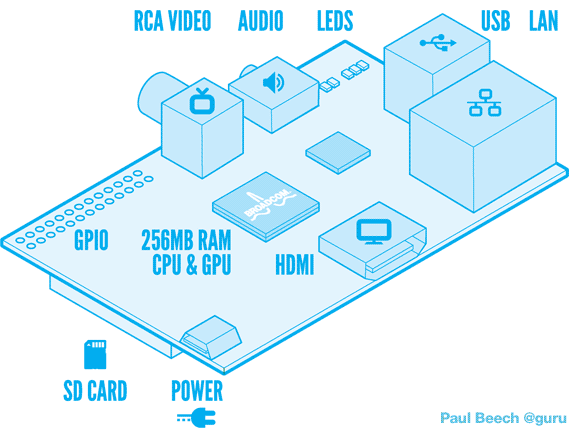
My latest gadget arrived on my desk yesterday. I haven't had a chance to turn it on yet. It features a 10/100 Ethernet port, 2 USB ports, 1 HDMI port, 1 RCA port, 1 3.5mm audio jack, SD Card slot for the OS, 1 micro USB connector for power and a number of other not so obvious connectors.


I've looked through the schematics and figured out what the other connectors do, what access I have and what are my current posibilities. So far I've figured there's a DSI port (Digital Serial Interface) for use with a touch screen. Nintendo DSi screens would be an example of the screen that can be used here, some other possible screens feature in the Apple iPhone or other Smart phones. There's a CSI camera connector as well, possible use could be something like the XBOX's Kinect. There's another connector which allows JTAG connection to the Broadcom SOC, which may he helpful in debug at some point, but I can't imagine it being much use without more specifics about the Broadcom BCM2835. The last connector is a large connector with GPIO's, I2C, Serial and a SPI interface as well as pins to provide 5V and 3.3V to external circuitry.


The one difficulty I can see so far is power. The Model B variant can use as much as 1.1A from a 5V source. The power comes from a micro USB port, which most people would power from a USB port on a desktop, laptop or TV. In most cases, USB ports only provide 0.5A at 5V. If the device tries to draw more current than available, then a drop in voltage will occur, causing some parts of the device to behave outside specification. This is all mentioned on the Raspberry Pi (RasPi) forums. Looks like I may need to sort myself out with a decent power source or build one myself. That's just my initial thoughts for the moment.

With regards what I'm going to do with it, I have a few ideas, most of which are robbed from everyone
  1. Multimedia server attached to my TV, giving me access to online streaming of videos, movies, tv series and music.
  2. Touch Screen Hi-Fi system, could be troublesome, no drivers exist yet for DSI port.
  3. Home Automation using zigbee around the house, turning on and off lights, controlling temperature, monitoring power and all that kind of thing.
  4. Serious car stereo upgrade providing music, name of song and easier use while driving.
  5. Attach a camera to allow for some sort of XBOX kinect gaming platform.
I'll have bigger and better ideas once I turn the thing on. Watch this space :)


Thursday, 26 January 2012

Assignments, Masters Project and Social Media cold turkey

I'm currently going mad trying to finish up my assignments for my 1st semester of the 2nd year of my Masters. I've had five to complete, I finally finished the first on Monday night. It was an assignment on the evolutionary product stages for Hybrid Cars and Hard Disks. My other assignments are a solution to the water distribution problem using innovating problem solving techniques. The other two assignments are based on research techniques using nVivo and SPSS. The final assignment, the killer one, which is soaking up all my time, is the implementation and optimization of a microprocessor and an SRAM on a BASYS 2 board. This last one is proving a serious challenge as my first real application in an FPGA. On the other hand, I've been secretly enjoying it.

On a very positive note, I've finally decided on what I want to do for my final year project. I found a great article in last month's IEEE Spectrum on the implementation of Crypto-Accelerators. The article provides plenty of research material and the topic seems really interesting to me. I'll post more on this once I finish my assignments and I can actually put some time on it.

On another note, I've decided to go cold turkey on social media in work. At first it started off checking Facebook during lunch, then the odd tweet every now and again. I got addicted though and it got worse, my productivity went down and it was horrible. So I've been two months clean, I edited the hosts file (computer file used in an operating system to map hostnames to IP addresses) in the Windows directory to block myself from drifting back. Since then I've been more productive, I've started to manage my time better and organise myself.

I can't wait until I'm finally finished these assignments. I'm off snowboarding with my friends to Avoriaz on the 4th February for a week. I really can't wait.

Now back to my laptop and the Xilinx ISE to create my testbench, simulate and script my verilog microprocessor.

Friday, 25 November 2011

New Business selling SnowSocks, doing a Masters and everything else


I've been incredibly busy the last while. There's a small part of me thinking I might be stretching myself beyond what I can possibly handle. But I think I'm well able for all of it. Who says you can't start up a new business while working a full time job and doing a part time Masters at night in Electronic Design Engineering?

My Masters has been proving very interesting so far. This semester I'm studying Digital Synthesis Modeling as well as Research Development Techniques and Problem Solving. For the Digital Synthesis Modeling, I've been using a Basys2 reference board to learn how to program in both VHDL and Verilog. The first three assignment proved difficult enough and a great basis for the fourth (capstone) assignment. The first three were: 1) Led flashing 2) Sequence Detect using switches and buttons 3) Implementation of Seven Segment display. The fourth assignment is the truly interesting one though. We have to design and implement a uP (microprocessor) connecting to an onboard SRAM, that sends and recieves data to and from the SRAM. This will prove difficult and may not even be possible on the Basys2 Board. Sure we'll see what happens. We also have to learn to script using command line scripting in DOS, Perl and TCL for complete automation of the synthesis process.

The Research Development Techniques and Problem Solving module has also proved very interesting and is a welcome break to all the technical work in the digital synthesis modeling. For the problem solving, we've looked at problem solving techniques including TRIZ, the nine-windows, 40 inventive principles, the contradiction matrix and many many more. We were also given a KAI test and I got a result of 95, which means I'm equally Adaptive as I am Innovative. I'd have to give loads of references here on what exactly that means, but I don't have time for that.

My new business venture has proved very very interesting. From ordering my stock from overseas, to customs and VAT, to advertising, marketing and selling at the markets, I have learnt so much so far. I still have a lot more to go as well. So far it's going really well and I hope to increase my sales in the coming weeks. I'm basically selling snow socks.

Here's my companies website (http://www.snowtyregrips.com) have a peak, I appreciate any and all feedback on the site. I appreciate it even more if you purchase one of my top quality snow socks from me.

I'll write more about the difficulties I found setting up the business and everything over the coming weeks, maybe over christmas I'll have time to write this all up.

Friday, 9 September 2011

Pension on Hold and Learning about Money!

Yesterday I requested my pension be put on hold indefinitely. Our account manager was none to happy about this and reminds me that I'll lose out on my company contribution and my tax relief. This a load of sales crap in my opinion. Now I don't claim to know a lot about how they work, but the company contribution at the moment is tiny, about €16 per month, I'm ok with losing that, no biggie. The tax relief thing is a bit of a sales pitch as well. Sure I don't pay tax on it now, but when I claim my pension back when I'm older, I'll have to pay that tax back (probably at a larger rate than now, looking at how the tax rates keep climbing). So basically, it's only really a deferral of tax payments.

Once the hold is placed on my pension, I asked for a copy of my current pension details. I've only been paying into my pension for about 16 months now, my total contributions are about €2800 and the current value is €2600. So, while I've been paying into my pension, my pension fund manager has been losing it. Seems like a wise choice to leave the pension completely. Why pay to lose money? They get paid regardless, for playing around with my money.

My goal is to use the extra income from my pension and make it grow for me. I've a long way to go with learning about stocks, shares and investing, but I hope to blog a bit about it and what I've done so far.

At the moment, I've been reading a few interesting books. These include:
Rich Dad Poor Dad by Robert Kiyosaki
Rich Dad Poor Dad 2: Cashflow Quadrant by Robert Kiyosaki
Think like a Champion by Donald J. Trump
The Art of War: Sun Tzu
The Winning Investment Habits of Warren Buffett and George Soros: What You Can Learn from the World's Richest Investors

I've also been playing Cashflow 101 (a board game about money and personal finance) with a few friends. You play as a rat in the rat race and the premise of the game is to break out of the rat race. You get a budget sheet where you keep track of your income, expenses and investments. The only way to break out of the rat race is to get your passive income to exceed your expenses each month. You're passive income consists of dividends from shares, cash made from rental properties and other investments. It's a great game and I'vhttp://www.blogger.com/img/blank.gife learnt a few things from the two games I've played already. Majority of the terms, properties and opportunities are all American based, but the lessons learned are the same. Basically, don't lose money.

On another note about money, I've been experimenting with Trading and I downloaded a demo account for Forex Trading, through ShareWatch's website. I had a brief goof around with it last night. You get 50,000 in your balance to start off with and you can buy and sell shares based on the real market at the moment. There's a huge number of options to choose from when viewing the graphs (looking at line graphs, max/min lines, candlesticks) and you can set up your own strategies for buying and selling and give you alerts when to sell and when to buy using the likes of MACD and DMACD and a number of other strategies. It was interesting. I was only able to buy and sell currency symbols and to be honest, it just feels like gambling. Like a good mate of mine says, it's 50/50, it's either going to go up or it's going to go down. There's as much prediction in this as there is in palm reading and horoscopes.

I'm trying to learn as much as I can and I'd love to hear what other people think about these books and the board game and their experiences with investing, so please feel free to comment below. Just keep it relevant and to the point.

Thursday, 21 July 2011

Rich Dad Poor Dad Stock Success Workshop

I just attended another one of Rich Dad's workshops last night. This time it was based on Stock Success. There's usually one of these a year and this one finished up yesterday. I attended one last year as well, it was based on property flipping and financial independence.

Robert Kiyosaki is the author of a large number of books called Rich Dad Poor Dad, I've read the first 2, but there are so many out there. They all teach you that there is another way to make money and make the money work for you. Live within your means and invest your money instead of spending it on liabilities (like houses, cars, boats).

My previous views of stock trading were minimal at best, here's a list of what I thought originally.
1) You need a stock broker to buy and sell stocks.
2) You can only buy and sell stocks.
3) To know what way the market will run, you have to look at a lot of financial records.
4) You can only make money when the market is good
5) You can only make money when the stock price goes up
6) I'd seen programs from it, I had tried one, ACM trading but I found it overly complicated and I was overwhelmed with where to start.

Last night, the speaker Liam Gilmore, who's a business owner, trader, property investor, public speaker and a CIPD qualified trainer gave us all a taste of how easy it can be to trade stocks. Basically he proved all my previous thoughts beforehand were incorrect.

There was a lot mentioned last night and of course there was the big sell for the full 3 day course to work with a guy named Alistair Crooks, (a professional stock trader) who guides you through all the different strategies to trading on the market safely. The course is €577 and more than likely worth every penny. Unfortunately, I have neither the time or the money for it at the moment (I know, a poor ehttp://www.blogger.com/img/blank.gifxcuse).

One of the most interesting things I learned last night was the MACD. This is a technical analysis indicator which can help you buy stocks quickly and with confidence. Another useful tool. Along with this, we were shown how to read the graphs and how to know when to buy and sell. Along with this, a few other terms were mentioned, but I won't go into here: resistance lines, support lines, limit order, bullish breakout, bearish breakout, double top, doji, inverted hammer and shorting.

There's 4 different types of traders
1) Position Traders - 2 - 3 Weeks between buying and selling
2) Swing Traders -> 2 days to 2 weeks between buying and selling
3) Day Traders -> 1 Day between buying and selling
4) Scalpers -> 5 Minutes between buying and selling
Swing Traders are a great place to start and Scalpers is the highest earnings and goal to aim for.

The biggest things to take away from the night were
1) Keep your emotions in check, the two strongest emotions in trading are fear and greed. With the right knowledge and education, you can overcome these and make money safely.
2) Need the ability to make a decision and make it quickly and correctly.
3) Ignorance is expensive
4) Education is one of your greatest assets, so build it and use it
5) Believe in opportunity and yourself
6) Value Knowledge - always learning
7) Take Action, make decisions
8) Number one influencing factor in failure is Procrastination!!

For more information, see the website below about Rich Dad Poor Dad and Robert Kiyosaki. I really recommend reading any of his books or his workshops, they are incredibly useful. Don't forget to act on them though, too many people read the book, go to the workshop and then do nothing.
https://www.richdadcoaching.com/rich_dad_poor_dad_coaching.html